

How to modify a 3D welding table to meet specific needs?
Oct 27, 2026
Leave a message
If you've ever spent hours fumbling to hold a metal part steady while TIG welding a custom frame or assembling a small metal bracket, you know 3D welding tables are game-changers. As someone who's been in the 3D welding table supplier game for years, I've seen firsthand how the standard tables work great for general metal fab, but they're not one-size-fits-all. Whether you're a hobbyist working on a vintage car restoration, a small fab shop cranking out custom steel gates, or a larger manufacturer doing specialized aerospace parts, modifying your 3D welding table to fit your exact needs can save you hours of frustration, reduce errors, and even cut down on material waste. Today, I'm breaking down exactly how to tweak your 3D welding table-no fancy engineering degree required, just some practical tips I've picked up talking to fab teams and hobbyists over the years.
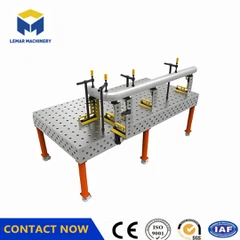
First, let's start with the basics: what even is a 3D welding table, and why modify it in the first place? For those new to this, a 3D welding table is a modular work surface with a grid of precision holes (usually 16mm or 28mm apart, that's D16 vs. D28 for the uninitiated) that let you clamp, fixture, and hold parts at any angle. The standard tables work for most jobs, but if you're regularly working on heavy steel beams, small intricate metal parts, or odd-shaped pieces that don't fit the standard grid, a one-size-fits-all table will leave you wrestling with parts instead of welding. That's where modification comes in-and before you start drilling or buying random parts, it's smart to map out your specific needs first.
Step 1: Audit Your Common Jobs to Avoid Wasting Time & Money
The worst mistake I see people make is modifying their table before figuring out what they actually use it for. A buddy of mine who builds custom motorcycle frames drilled extra holes all over his table because he thought he needed more clamping points, only to realize he almost never works on parts larger than 2ft long. Now he's got a table full of useless holes that mess up his clamps. So first, grab a notebook (or your phone, no judgment) and track all the jobs you do over 2-3 weeks. Jot down: the size of your parts, how much they weigh, what angles you need to hold them at, and any pain points (like, "I always struggle to hold this curved pipe steady" or "My clamps keep hitting each other when I'm working on long beams"). That audit will tell you exactly what modifications you need, instead of guessing.
For example, if most of your work is small metal brackets or jewelry-adjacent metal fab, you'll want to focus on precision, not heavy load capacity. If you're regularly handling 50+lb steel plates or large beams, you'll need to prioritize load distribution and heavy-duty clamping points. Our 3D Welding Platform For Metal Fab is a great base for most standard jobs, but even that can be tweaked to fit your workflow. Let's get into the actual modifications you can do, starting with the easiest (and cheapest) ones first, so you don't have to rip apart your entire table on day one.
Step 2: Tweak the Grid & Hole Layout for Your Specific Part Sizes
The grid of holes is the heart of any 3D welding table, right? Standard tables come in D16 (16mm hole diameter, 100mm spacing) or D28 (28mm hole diameter, 50mm spacing). If you're working with really small parts-like 1/8in steel tabs-you'll want a tighter hole grid to fit your tiny clamps. If you're working with thick, heavy steel, the larger D28 holes can handle bigger clamps and more load. Wait, but what if you have a mix of both? You don't have to buy a whole new table. One common hack we recommend is adding a secondary grid insert to your existing table. These are small, interchangeable plates with smaller (or larger) holes that you can pop into the surface of your main table only when you need them. So if you're doing a small bracket job, drop the D16 insert; if you're moving to a large beam, swap it out for your standard D28 plate. That way, you get the best of both worlds without drilling permanent holes in your table.
Another grid tweak: if you regularly work with parts that are, say, 1.2m long, the standard 1m x 1m table might be too short. Don't buy a whole new table-add extension grids. We sell Steel Welding Workbench Table extensions that line up perfectly with the main grid, so you can extend your work surface to 1.5m or 2m just by locking them into place. No drilling, no messy modifications, just a quick swap. Pro tip: label your grid lines with a sharpie so you can line up parts faster-saves 10 minutes per job, trust me.
Step 3: Add Custom Fixtures & Clamps for Odd-Shaped Parts
This is where most people struggle. You've got a weirdly shaped metal part-like a curved motorcycle frame or a custom gate with uneven edges-and standard clamps won't hold it steady. So what do you do? Modify your table to add custom fixture points. The easiest way is to use modular fixturing pins. These are steel pins that lock into your table's holes, and you can attach custom arms, brackets, or even 3D printed adapters to them. Wait, 3D printed adapters? Yeah, lots of guys do that-if you have a curved part, design a simple adapter in Fusion 360 that fits the curve of your part, print it in PETG (it's heat-resistant enough for welding sparks, and strong enough to hold small parts), and then lock it into a fixturing pin on your table. No drilling required, and you can reuse the adapter for future jobs.
If you're working with heavier parts, like large steel beams or equipment frames, you'll need more robust fixtures. That's where our Welding Fixture Table D28 style heavy-duty clamps and fixtures come in. These are built to handle up to 1000lbs per point, so they won't slip or shift mid-weld. One trick I love for odd angles: add adjustable tilt tables to your main 3D table. These are small, hinged platforms that you can lock at any angle from 0 to 90 degrees, so you can hold a part at a 45-degree angle for fillet welding without having to prop it up with random blocks of wood. We offer custom tilt tables too-if you regularly work on parts that need a specific angle, like 30 degrees for a custom bicycle frame, we can make a tilt table set to that exact angle so you don't have to adjust it every time.
Step 4: Adjust Height & Accessibility for Your Workflow
How many times have you been hunching over a table that's too short, giving you a back ache after an hour? Or reaching up to weld on a part that's too high, straining your arms? Modifying the height of your 3D welding table is a game-changer for comfort and productivity. Most standard 3D tables are around 90cm tall, but if you're 6'2, that's way too short, and if you're working on your knees (like a hobbyist in a small garage), it's way too tall. The fix? Height-adjustable legs. You don't have to buy a whole new table-just swap the fixed legs for telescoping legs that you can adjust from 70cm to 110cm with a simple turn of a knob. Some of our clients who work in small garages also add casters to their table legs, so they can roll the table out of the way when they need more floor space for large parts. That's a huge win if you're working in a tight shop.


Another accessibility tweak: add side shelves to your table. Keep your clamps, welding rods, and tape measure within arm's reach, instead of walking across the shop every time you need a tool. We even have modular side shelves that lock into your table's grid, so they don't wiggle or fall off mid-job. No more searching for your C-clamp while your part is shifting on the table.
Step 5: Customize for Specialized Jobs (Not Just General Welding)
If you're not doing general metal fab-if you're making custom RV parts, or aerospace brackets, or even sculptural metal art-you'll need more specialized modifications. That's where custom work comes in, and our Special Welding Platform line is built exactly for this. Let's say you regularly work on large, thin metal sheets that warp when you weld them. A standard table's grid might not hold the sheet flat, so you can add vacuum channels to your table. These are small, integrated channels that suck air from the surface of your table, holding the thin sheet perfectly flat so it doesn't warp. No more fighting with distorted parts.
Another specialized modification: if you do a lot of pipe welding, add pipe vices or cradle fixtures to your table. These lock into the grid and can hold pipes of any diameter, so you don't have to prop them up with sandbags or scrap metal. We've had clients in the oil and gas industry modify their tables with custom pipe cradles that can hold 12-inch diameter pipes at any angle, making their welding jobs way faster and more accurate. For hobbyists doing vintage car restoration, we've added custom mounting points for specific car frames, so they can hold the entire frame steady while they weld on new panels.
Step 6: Common Mistakes to Avoid When Modifying Your Table
Before you grab your drill, let's talk about the mistakes I see people make all the time that end up costing them time and money. First, don't drill permanent holes into your table unless you absolutely have to. Modifications should be reversible-drilling holes weakens the table, and if you decide you want to change your setup down the line, you're stuck with extra holes that mess up clamping. We recommend using modular inserts and fixturing pins that lock into existing holes instead. Second, don't overload your table. Even heavy-duty tables have a load limit-check the specs (ours have a 500kg load capacity for standard models, 1000kg for D28 heavy-duty) and don't put a 800lb beam on a table rated for 500lb. That's a quick way to bend your table and ruin your parts. Third, don't forget about weld spatter. When you modify your table, make sure any added parts are made from low-carbon steel that's easy to clean-avoid aluminum, because weld spatter sticks to it and is a nightmare to remove. We coat all our table parts with a ceramic anti-spatter coating, so you can wipe off spatter with a wire brush in 10 seconds instead of grinding it off.
Another big mistake: not planning for future jobs. If you think you'll start doing larger parts in 6 months, leave extra grid space when modifying your table. Don't fill every hole with clamps right now, because you'll need that space later. And finally, test your modifications before you start welding. Lock a part into your new fixture, wiggle it, make sure it's steady, and do a test tack weld before laying down a full bead. That way, if something is off, you can adjust it without ruining your part.
Now, let's wrap this up. Modifying a 3D welding table isn't about making it more complicated-it's about making it work for your jobs, not the other way around. Whether you're a hobbyist building your first custom table or a fab shop owner looking to cut down on production time, small modifications to your grid, fixtures, height, or layout can make a huge difference. Our company has been in this game long enough to know that one size never fits all, which is why we offer a range of modular tables and add-ons to help you tweak your setup exactly how you need it.
If you're tired of your welding table holding you back, and you want to find the right base or modifications for your specific workflow, reach out to our team. We don't do one-size-fits-all sales-we'll help you audit your jobs, pick the right table and add-ons, and walk you through how to modify it so you can spend less time wrestling parts and more time welding great work.
Send Inquiry